A username and passphrase is required to access restricted areas on the Luther Seminary website and to access Luther Seminary email. Official correspondence from the seminary is sent to Luther email accounts. New students are sent a username and an initial passphrase by email from the Admissions office, which should be changed upon receipt, using the instructions below.
Change Your Passphrase
- Go to account.luthersem.edu/
- Enter your username and current passphrase in the Sign In box
(Your username does not include @luthersem.edu.) - Enter the new passphrase twice.
- Passphrase requirements
- It must be at least 16 characters long.
- Use whatever characters you want. Most people string a bunch of words together like “wind Denver lock wave road Jeff” or pick a song lyric or a phrase like “I love cheese sauce.” Just be sure it’s not something that is obvious based on knowledge of you.
- Click the Change Password button and you are done.
Reset Your Passphrase
Reset your passphrase at account.luthersem.edu
Students, alum, faculty and staff can reset passphrases on your own by setting an alternate email address connected to your @luthersem.edu account.
- Register your alternate email address by signing in at account.luthersem.edu/ and clicking the Enrollment tab. Add an alternate email address – you will be sent a verification code at this email address that you will need to enter in order to proceed. You will now be able to reset your passphrase using this email address.
- Forgot your passphrase? Visit account.luthersem.edu/ and click on “Forgotten Password.” When prompted for your “domain user name” enter the first part of your email address (before the @ symbol). You will be prompted to select your alternate email address and type the characters in the captcha message. An email will be sent to your alternative email address with a link to reset your passphrase. You will receive a message if your passphrase change was successful. If so, you may use it to login. Note that your passphrase is case sensitive.
Keep in mind you can only use the reset link if you have an alternate email address registered.
Trouble with Passphrase Reset Link
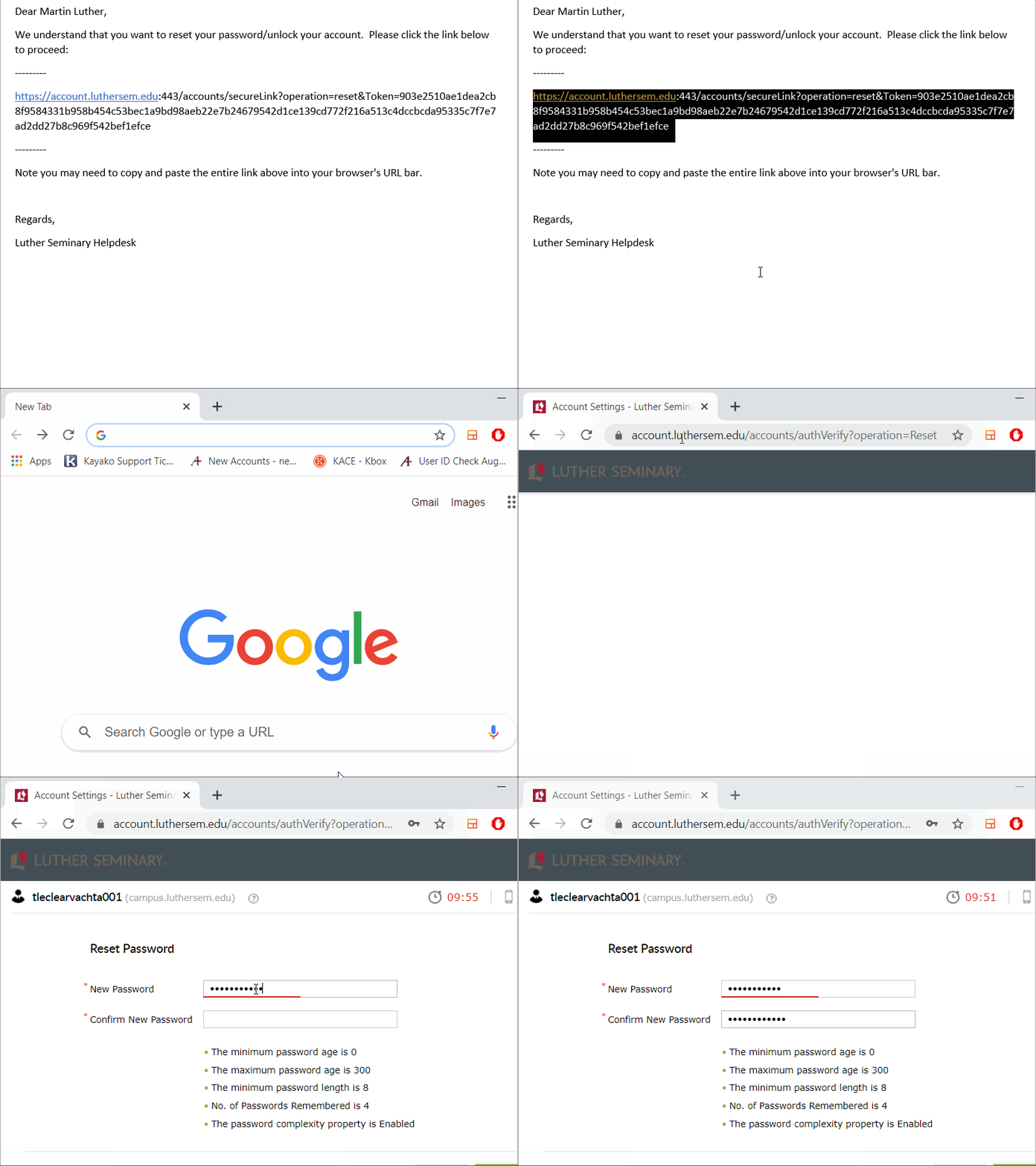
Sometimes email applications do not recognize the full passphrase reset link. In this case, you need to copy the entire passphrase reset link and paste it into your browser. See example below:
No automatic expiration (with exceptions)
- Your Luther Seminary passphrase never expires unless you are someone who accesses institutional data as part of your job a the Seminary.
- If you are phished and your passphrase is stolen you will need to change your passphrase to regain access to your account. Contact the Help Desk for assistance.
- Users cannot use a previous passphrase to create a new working passphrase.
Contact Help Desk
If you have tried the above steps and they don’t work, then
Please call the Luther Seminary IT Help Desk at (651) 641-3462
Or send an email from a working email account to helpdesk@luthersem.edu requesting that your passphrase be reset.
IT Helpdesk personnel will need to know your username and your student ID number to reset your passphrase.